Showing posts with label Java. Show all posts

July 03, 2014

Comparable & Comparator API

Total order
A total order is a binary relation ≤ that satisfies:
・Antisymmetry: if v ≤ w and w ≤ v, then v = w.
・Transitivity: if v ≤ w and w ≤ x, then v ≤ x.
・Totality: either v ≤ w or w ≤ v or both.
Ex.
・Standard order for natural and real numbers.
・Chronological order for dates or times.
・Alphabetical order for strings.

 Note that the <= operator for double is not a total order. Double.NaN <= Double.NaN is false.

Comparable API
Implement compareTo() so that v.compareTo(w)
・Is a total order.
・Returns a negative integer, zero, or positive integer
if v is less than, equal to, or greater than w, respectively.
・Throws an exception if incompatible types (or either is null).

Tips:
To sort an Array, use the Arrays.sort().
To sort an ArrayList, use the Collections.sort().

Natural Sorting of numbers:

Output: 1,2,3,5,7,10,16,23,46

Incorrect sorting of cars:
Let us consider taking a car class with the data members as shown below.


Here the client tries to sort an array consisting of three cars. But do you see the problem?

Yes. This cannot be sorted by Java because we haven't told it what is the order to be followed and which data member should be considered to be sorted. This is why we implement the comparable interface. The output of above as expected would be.

Correct Sorting of Cars:
Shown below is the class diagram:

Here the Car class now implements the comparable Interface and defines the total order in compareTo() method.
Output: Mazda,Honda,Toyota

Correct Sorting of Cars with different properties:
You do not have to implement Comparable but you have to create static members of type Comparator which overrides the method compare(). Below is shown the class diagram.
Code:
package george.comparablesWithComparator;

import java.util.Comparator;

public class Car{

private String make;
private String model;
private int cost;
public String getMake() {
return make;
}
public void setMake(String make) {
this.make = make;
}
public String getModel() {
return model;
}
public void setModel(String model) {
this.model = model;
}
public int getCost() {
return cost;
}
public void setCost(int cost) {
this.cost = cost;
}
public static Comparator carCostComparator = new Comparator() {

@Override
public int compare(Car c1, Car c2) {
if(c1.cost < c2.cost)
return -1;
else if(c1.cost > c2.cost)
return 1;
else
return 0;
}
};
public static Comparator carModelComparator = new Comparator() {

@Override
public int compare(Car c1, Car c2) {
if(c1.model.compareTo(c2.model) < 0)
return -1;
else if(c1.model.compareTo(c2.model) > 0)
return 1;
else
return 0;
}
};
public static Comparator carMakeComparator = new Comparator() {

@Override
public int compare(Car c1, Car c2) {
if(c1.make.compareTo(c2.make) < 0)
return -1;
else if(c1.make.compareTo(c2.make) > 0)
return 1;
else
return 0;
}
};
}


package george.comparablesWithComparator;

import java.util.Arrays;

public class ClassClient {

/**
* @param args
*/
public static void main(String[] args) {
Car car1 = new Car();
Car car2 = new Car();
Car car3 = new Car();
car1.setCost(1000);
car1.setMake("Honda");
car1.setModel("City");
car2.setCost(120);
car2.setMake("Mazda");
car2.setModel("ZX-1");
car3.setCost(90888);
car3.setMake("Toyota");
car3.setModel("Qualis");
Car[] carArray = {car1, car2, car3};
System.out.print("Sorting by Make: ");
Arrays.sort(carArray,Car.carMakeComparator);
for(Car c : carArray)
{
System.out.print(c.getMake() + ",");
}
System.out.println();
System.out.print("Sorting by Model: ");
Arrays.sort(carArray,Car.carModelComparator);
for(Car c : carArray)
{
System.out.print(c.getModel() + ",");
}
System.out.println();
System.out.print("Sorting by Cost: ");
Arrays.sort(carArray,Car.carCostComparator);
for(Car c : carArray)
{
System.out.print(c.getCost() + ",");
}
}

}


July 02, 2014

The crux of Java collections - Stack, Queue & Bags

Collections is one of the most important standard library available in Java. It allows developers to take the power of generics and Iterator and develop code which expects less input from the user and allows good reusability. All references are from Dr.Sidgewich codebase. Collections can be implemented using linked list or array.

Here I am going show my implementation of Queue using basic re-sizing array, implements Iterable interface and is generic. Below is shown the class diagram. This can be easily ported into stack and bags using simple logic changes.

Code:

package george.queue;

import java.util.Iterator;

public class VariableCapacityQueue implements Iterable {
private E[] s;
private int N = 0;

public VariableCapacityQueue() {
s = (E[]) new Object[1];
}

public boolean isEmpty() {
return N == 0;
}

public void enqueue(E item) {
if (N == s.length)
resize(2 * s.length);
s[N++] = item;
System.out.println("array size is "+s.length);
// array size increament verified
}

public E dequeue() {
// return s[--N];//just moves the pointer but not the element//So
// modifying code
E temp = s[0];
s[0] = null;
moveElements(s.length);
N--;
// The above two steps prevents loitering
if (N > 0 && N == s.length / 4)// otherwise will terminate at -1 itself
resize(s.length / 2);
System.out.println("array size is " + s.length);
return temp;
}

private void resize(int capacity) {
E[] copy = (E[]) new Object[capacity];
for (int i = 0; i < N; i++)
copy[i] = s[i];
s = copy;
}

private void moveElements(int capacity) {
E[] copy = (E[]) new Object[capacity];
for (int i = 1; i < N; i++)
// first element in queue removed so n reduced by 1
copy[i - 1] = s[i];
s = copy;
}

public class ListIterator implements Iterator {
private int i = 0;

public boolean hasNext() {
return i < N;
}

public void remove() {
}

public E next() {
return s[i++];
}
}

public Iterator iterator() {
return new ListIterator();
}


}


Performance:

Order of Growth:
Running time is worst when compared to Linked List implementation because of moveElements() method being called each time something is dequeued.  Thus dequeue operation has a order of growth  O(N^2). Enqueue operation consumes in the order of O(N) for elements of size N. Any suggestion to improve dequeue implementation is welcome.

Memory:
The memory consumption will be almost similar to the one shown below. Expect for the fact that we are using generics so the 8N + 24 for String  will be xN + 24 depending upon the datatype used for storing in the array. Similarly padding will change accordingly.

July 01, 2014

UnionFind for Dynamic connectivity

Union Find is used to find the connection between two objects.
Why do we need Union Find algorithm?

There are three approaches to implement this each with it's own complexity.
1. Quick Find:
Simplest but does union is quadratic in nature
2. Quick Union:
Union is Linear time but find also becomes linear which is constant in Quick find
3. Weighted QuickUnion:
Union and find are logarithmic in nature

Implementation:
The class diagram of my implementation uses code from Dr.Robert Sidgewich's code base. Here I use the template method and strategy pattern to do a quick comparison of performance of all the three types.
The following images show how the implementation is done.
UF is the abstract class from which all other union find classes inherit


UFclient uses the strategy pattern by invoking run() from the main factory method.

QuickFind inherits from UF and uses a single array with a simple idea to find connectivity as shown below.

 QuickUnionUF inherits from UF and uses a single array with tree structure to find connectivity as shown below.

QuickUnionUF inherits from UF and uses a single array with tree structure to find connectivity as shown below. It goes one step further to use a second array for maintaining and balancing weight on the tree.


Performance:

Significant performance difference can be observed from the output as shown below

Time taken for QuickFindUF is 177
Time taken for QuickUnionUF is 66
Time taken for WeightedQuickUnionUF is 25

You can see the difference between Quadratic vs Linear vs Logarithmic time. They are in the ratio 7:3:1

June 30, 2014

Why do we need better algorithms?

This is the most fundamental question every student must ask himself before taking a course on Algorithms. Rather than talking too much about algorithms let me straight away give examples. All the shown examples are from the speech 'Beyond Computation - Michael Sipser'
Problem 1: Finding the factorial of a large number.
We still don't know whether there is any other possible way to find the solution or not.
Problem 2: Finding the largest clique in a given graph with 100 nodes
But trying to find a large clique in the below figure is very difficult for the computer.
Solution: Trying to find the analogy of magnet in mathematics
If you can find the magnet, you are one of the most Intelligent on the planet.
Other Problems:
So you can see that the biggest challenge is 
This is the ultimate reason why we need better algorithms.
To understand more, let me show you the difference between P and NP problems
If P = NP is proved, then we do not need to search for a search algorithm else we need to search. Whether P = NP or P != NP is a mystery.

NP-Completeness
This is the first step taken by humans towards solving an NP problem. NP-Completeness defines that a set of problems are linked to each other and can be easily transformed into each other which means if there is a solution to one problem, then the solution for the other can be found but the reverse is not true. Eg: Factoring can be converted into CLIQUE but not CLIQUE into Factoring

NP-Hard:
There are NP problems for which even checking is not possible. These are called NP-Hard. Eg of such a problem is Chess.

Will it ever be solved?

June 26, 2014

Java Statements

Java statements is the most fundamental topic to master to be an effective Java programmer.
Four types of statements are:

Assignment Statement:

Assignment statements of all primitives will return their primitive values.
1. Value can be assigned as shown below
int a;
int b;
a = (b=true);


2. common type of assigning value is
int a = 9;

3. Remember that the only valid literal values for the boolean primitives are true and false. Below statements are invalid
boolean isValid = TRUE;

boolean isValid = 1;

Conditional Statement:

Valid scenarios
1. true  or false statements and the following type of assignment statement is correct inside a if statement.
boolean a = false;
if(a = true)
{}

2. Boolean wrapper class can be used as unboxing is the automatic production of its primitive value in cases where it is needed. So the following code is correct.

Boolean wrapperBoolean = new Boolean("true");
if(wrapperBoolean)
{}

3. Order does not matter in the switch cases. If a case is satisfied then default is ignored.
int a = 1;
switch(a)
{
  default:
     System.out.println("Default executed first");
  case 1:
     System.out.println("a executed first");
}
Output:  a executed first

4. String can be used in cases starting Java 7

String a = "hello";
switch(a)
{
    default:
        System.out.println("Default executed first");
        break;
    case "1":
        System.out.println("1 executed first");
        break;
    case "hello":
        System.out.println("hello executed first");
        break;


}
Output: hello executed first

5. Arithmetic operations are allowed in case as shown below

int a = 2;
switch(a)
{
    default:
        System.out.println("Default executed first");
        break;
    case 3-1:
        System.out.println("2 executed first");
        break;

}
Output: 2 executed first

6. Switch fall through can be taken advantage because all the cases following a success case without a break will get executed. Eg of fallthrough is shown below

public class SwitchDemoFallThrough {

    public static void main(String[] args) {
        java.util.ArrayList futureMonths =
            new java.util.ArrayList();

        int month = 8;

        switch (month) {
            case 1:  futureMonths.add("January");
            case 2:  futureMonths.add("February");
            case 3:  futureMonths.add("March");
            case 4:  futureMonths.add("April");
            case 5:  futureMonths.add("May");
            case 6:  futureMonths.add("June");
            case 7:  futureMonths.add("July");
            case 8:  futureMonths.add("August");
            case 9:  futureMonths.add("September");
            case 10: futureMonths.add("October");
            case 11: futureMonths.add("November");
            case 12: futureMonths.add("December");
                     break;
            default: break;
        }

        if (futureMonths.isEmpty()) {
            System.out.println("Invalid month number");
        } else {
            for (String monthName : futureMonths) {
               System.out.println(monthName);
            }
        }
    }
}
This is the output from the code:
August
September
October
November
December

7. Following statement compiles without any problem.
if (x == 0) ; else if (x == 1){} else {;}

8. Following statements compiles without any problem.
if (true) ;
if (true) {}
if (true) {;}
if (true) {;;}
if (true) ;{};

Invalid scenarios

1. Since assignment statements return their primitive values, following code will fail to compile
int a = 1;
if(a = 2)
{}

2. Ranges are not allowed in cases.

3.Following statement throws compilation error because no space between elseif
if (x == 0) {;} elseif (x == 1) {System.out.println("Valid Statement");}

How to compile and interpret Java code in command line?

Compilation & Interpretation life cycle is shown below

To compile your java code:
Using -d & -cp option
javac -d classes -cs somedirectory/classes/:. JavaOutput.java
Here -d = directory switch telling the compiler to save the output class file in the classes directory. Sub-directories are created according to package names
         classes = destination directory
         JavaOutput.java = is the file to be compiled.
         -cs = classpath switch telling the compiler to find the user-defined classes and packages in the specified directory
         somedirectory/classes - contains the user defined classes
Note that : is a delimiter in POSIX systems and .(period) is the current directory

All the available options are shown below

To interpret your java code:
Interpreter is used to interpret bytecode and execute your program.
java Car
executes Car.class file. Option -cs is similar to compiling code and -D switch is used to set property values

All the available options are shown below

June 17, 2014

Java Class Structure

Conventions are used to increase the maintainability of Java code across multiple developers & projects. Below shown is the tabular column consisting of the naming conventions & symbols used in Java

June 15, 2014

Working with Java Jar files

1.  Create a normal Java project


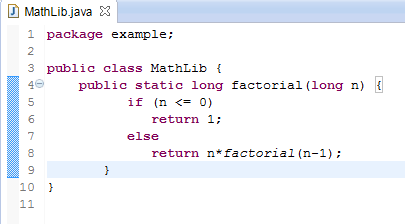
2. Create a class with the necessary methods with static declaration as shown below.


3. Once free of errors, click file > export and click 'JAR file' from the options shown


4. Select the project and click finish in the following screen


5. Now the jar file contains the the class files and is ready to be used in any project. To check out how it's working create a separate project and use the method as shown below. Right click > properties on the newly created project


6. Click 'Add External JARs ' and add the created jar in your project.


7. The added JAR appears as shown in the 'Referenced Libraries'


8. Now use it in your project by directly invoking the method name without instantiating the MathLib class as shown below

June 13, 2014

Java Packages

In Java, import is simply used by the compiler to let you name your classes by their unqualified name, let's say String instead of java.lang.String. You don't really need to import java.lang.* because the compiler does it by default. However this mechanism is just to save you some typing. Types in Java are fully qualified class names, so a String is really a java.lang.String object when the code is run. Packages are intended to prevent name clashes and allow two classes to have the same simple name, instead of relying on the old C convention of prefixing types like this. java_lang_String. This is called namespacing.

Oracle includes 209 packages in the Java SE 7 API. You can either do a explicit import or a implicit import.


import java.util.ArrayList; - explicit
import java.util.*; - implicit


Since import is straight forward let me show you how to do import static. import static  is useful whenever you are trying to access static data members of a class.

1. There are two classes called Car and Vehicle where we are trying to access static variable BUGATTI without instantiating an object of Car in main method of vehicle.

package com.george.cars;//0 or 1 package name only
public class Car {
public static final int BUGATTI = 1;
public static final int GOLF = 2;
public static final int JETTA = 2;
}

package com.george.vehicles;//0 or 1 package name only
import com.george.cars.Car;//here importing normally
public class Vehicle {
public Vehicle(int type) {
if (type == BUGATTI) {
System.out.println("Hello bugatti");
}
}
public static void main(String[] args) {
Vehicle v = new Vehicle(BUGATTI);
}
}


But the above code throws compilation errors because the static variable BUGATTI is not visible from the other package as static is not used. But the following is correct,

package com.george.vehicles;//0 or 1 package name only

//import com.george.cars.Car;//no need to import
public class Vehicle {
public Vehicle(int type) {
if (type == Car.BUGATTI) {
System.out.println("Hello bugatti");
}
}
public static void main(String[] args) {
Vehicle v = new Vehicle(Car.BUGATTI);
}
}

This is because, we have told the compiler that we use a variable BUGATTI from the car class. But as you can see, each time we have to repeat Car.BUGATTI which is annoying and involves more typing so alternative approach is shown below,

package com.george.vehicles;//0 or 1 package name only

import static com.george.cars.Car.BUGATTI;
public class Vehicle {
public Vehicle(int type) {
if (type == BUGATTI) {
System.out.println("Hello bugatti");
}
}
public static void main(String[] args) {
Vehicle v = new Vehicle(BUGATTI);
}
}


Also note that we can invoke nested static classes from another project like this import static george.logger.Timber.DebugTree; where DebugTree is a static class


Widely used Java packages are,

1. java.util.*; - collections, date/time


2. java.awt.*; - to paint basic graphics & images


3. java.io.*; - data streams I/O


4. java.net.*; - networking


5. javax.swing.*; - lightweight components for GUI
The prefix java is commonly used for the core packages. The prefix javax is commonly used for packages that comprise Java standard extensions. javafx will replace javax.swing


Links: how-java-import-works
Note: Two packages are implicitly imported into a class. One is the java.lang package and the other is the default package in which we are working.